How OpenAI Optimized AI Agents For Scale
Inside the Harness, API, and Inference efficiency optimizations that support the fast growth of Codex and ChatGPT Work.
Intro
With the skyrocketing growth of Codex and ChatGPT Work to roughly 10M users, there’s a huge need for optimizations in order to support that kind of scale.
As you know, building the infrastructure behind efficient AI Agents is a lot more complex than building an infrastructure for a chatbot-like interface.
The reason is that AI agents can take many different paths to complete a task, and because LLMs are non-deterministic, the same prompt can produce different responses. This makes their behavior much harder to predict, debug, and test.
I’ve recently had the pleasure of talking to:
Joe Gershenson, who is leading the Core Agent team at OpenAI
Ahmed Ibrahim, who is working on Agent Harness
Steve Coffey, who is working on the API powering Codex and ChatGPT Work
They shared a lot of interesting insights with me on the call, and also in writing as well.
And in today’s article, I’m sharing the main performance improvements OpenAI has recently made in order to support the scale and growth of their user base.
Let’s start!
Beyond picking the right model for a specific job
With the recent release of the GPT‑5.6 series: Sol, Terra, and Luna, each model is designed for a different use case.
Sol, being the flagship model, has the highest intelligence and strongest reasoning, but it’s also more costly.
Terra is made for everyday work and is a good balance of quality, speed, and cost
And Luna has the fastest responses and lowest cost, but is not as good at reasoning.
So, choosing the right model alone can definitely help both at the infrastructure level and also for the users to get faster responses that potentially cost fewer tokens as well.
But in this article, we’re going beyond just the model selection, we’re going into actual infrastructure optimizations that make AI agents both token-efficient and performant.
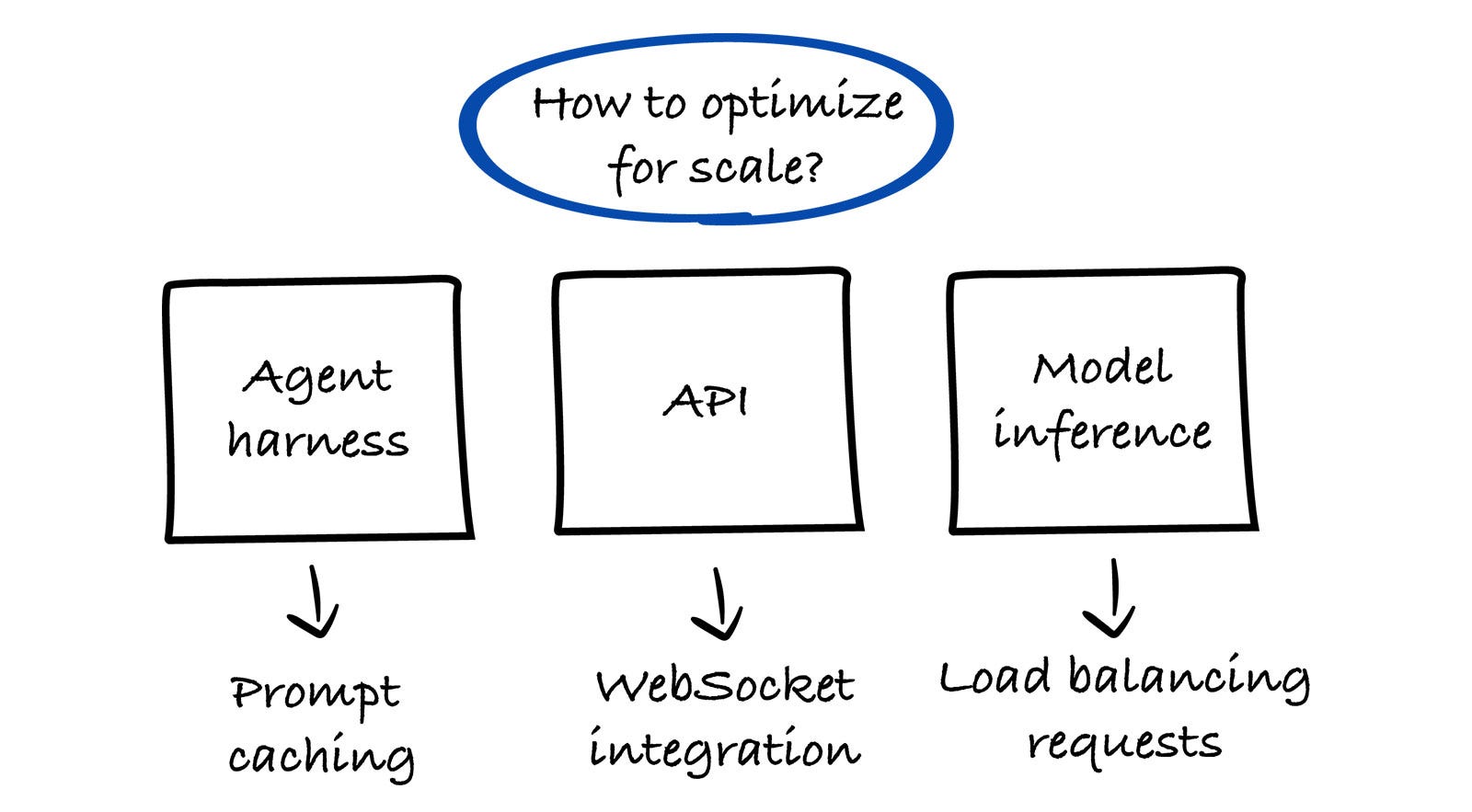
The 3 layers of efficiency behind AI Agents
Whenever we’re talking about how to make AI Agents more efficient, the 3 main layers that we need to look at are:
The agent harness
It’s the infrastructure that runs the AI Agent. Think of the harness as the layer that decides HOW an agent performs a certain action, while the LLM decides WHAT an agent needs to do.
Without the harness, an AI agent can only answer questions, but with the harness it can search the web, read files, write and run code, call APIs, recover from errors, etc.
API
The API is the communication layer between the Agent Harness and the LLM. Every time the agent needs the model to reason, plan, or generate a response, it makes an API request.
The more efficiently the API can send requests and receive responses, the faster and cheaper the entire agent becomes.
To complete a certain task, an agent usually sends a lot of different requests, so even small improvements in API efficiency can have a huge impact.
Model inference
Inference is the process of the LLM generating a response from the input it receives. This is where the actual reasoning, planning, and text generation happen.
Inference is usually the most computationally expensive part. It runs on GPUs, and GPUs are always a bottleneck, so making this part more efficient is crucial.
In this article, we’ll go through the performance improvements made in each layer. Let’s first start with inference.
1. Inference optimizations
As mentioned, computational power is always a constraint, so being able to utilize GPUs as efficiently as possible is crucial.
The performance optimization improvements made on inference have been shared with me by OpenAI’s team in writing, but the interpretation of them are adapted for this article.
The most recent important efficiency improvements on inference that the team at OpenAI has recently done are the following.
Load balancing the requests
The team has shared that they distribute work across model instances within 2 criteria. The first one is a global distribution, based on geography, available capacity, and also accelerator type (the type of GPU or specialized chip running the model). The accelerator type varies based on the specific model.
And the second load balancing happens within the cluster of GPUs, they distribute work across model instances based on the load, context length, cache availability, and some other request properties.
They’ve seen improvements, especially with the use of GPT-5.6 Sol in Codex, they can better analyze the traffic and correctly route the requests to the right model instance.
Optimization to the model’s forward pass
A forward pass is the process of getting an output based on the specific input. The process is as follows: Prompt → model calculations → probability for the next token.
For example, if your prompt is: “The capital of France is”. During a forward pass, the model processes the text and calculates that “Paris” is a likely next token. Each new token usually requires another forward pass. So, a 100-token response likely needs 100 forward passes.
An interesting thing that the team has shared with me is that with Codex and their latest model (GPT-5.6 Sol), an AI agent was able to autonomously optimize their production kernels, which is the core code that executes the mathematical operations of the model.
The reason that the new model was able to provide effective improvements to the production kernels is because it was trained on Triton and Gluon, two open-source GPU programming languages maintained by OpenAI.
They’ve mentioned that these optimizations reduced end-to-end serving costs by 20%.
Speculative decoding
This is another lever they have worked on, and it’s a technique where you run a smaller model alongside the primary model.
The smaller model proposes several tokens for the primary model to verify in parallel, and when those proposals are accepted, the system can produce multiple output tokens from a single primary-model pass. This heavily reduces the overall computation needed.
And interestingly, similar to improvements to the production kernel, they utilized their latest model (GPT-5.6 Sol) to make improvements on speculator training autonomously.
The team has shared that these improvements increased token-generation efficiency by more than 15%.
They also mentioned that the inference optimization is a continuous feedback loop, and it’s important to measure production behavior and identify the gaps and implement the changes needed, while making sure they actually improve the whole system.
2. API optimizations
In our conversation with Steve Coffey, who is working on the API for both Codex and ChatGPT Work, he mentioned that the 3 core metrics they track in their API are the following:
Time to first token (TTFT): The amount of time between getting the input, sending the request to an AI model, and receiving the very first generated token.
Time between tokens (TBT): Tokens arrive one-by-one, so this metric is related to how quickly each token arrives.
End-to-end time (E2E): how long it takes to receive a complete response
Steve also mentioned that the most important metric is the first one (TTFT), it gives a good insight into the performance of their API both in receiving the input, doing a certain logic, and then sending the request to the AI model and receiving the response.
At this point, I’ve asked about what they prefer more, the overall speed of their API or its availability. And Steve mentioned that availability is the most important, and they aim for 99.99% availability on their requests.
The reasoning is that it’s much better that the user gets the desired output (even if slower) than not at all.
Now, let’s go to the 3 core improvements they made in their API in order to support the high usage. The first one is definitely the biggest one.
From REST API to WebSocket integration
They’ve seen one of the biggest performance improvements by moving a lot of the communication between the AI Agent communicating via REST API to WebSockets.
The reason is that when sending a request to a REST API, for every request you need to go through the initial connection, which can add up to a significant amount of time, especially with a large number of requests being sent. Which, of course, as we mentioned, an AI agent does send, even for a simple task.
The big benefit of using a WebSocket API is that the handshake happens only once (to establish the connection), and then the data gets sent over that connection in a lot more efficient way.
Steve mentioned that they are supporting both the REST API and the WebSocket at the same time, as some of the specific parts still go through that API, and also if the network connection of a user is very bad, they will fall back to the REST API communication.
I’ve asked Steve if supporting both is a problematic part, but he mentioned that not at all.
There are some specific nuances to both parts, like for the WebSocket API, they need to support many long-lived connections, and if they do another deployment, they need to ensure that the users get reconnected after.
The reasoning for not being as problematic is that the core logic behind both APIs is the same, just the way these parts receive and send data is different. But the core logic of security, analyzing, and talking with AI models is the same.
Sending only new things to the API, not the full context of the conversation
Think about the full Codex session and the back-and-forth conversations that you have. Before the optimization, they used to send the full context of the conversation in every request, which, especially in larger conversations, could take a long time to process.
With the WebSocket integration, they are now sending only the data that is new, and they keep the state of the context on the server. The first call of the session starts the context, and it builds up on every piece of data being sent.
The data that’s being sent contains only what’s new + the reference to the conversation, so that the backend knows where to store that data.
With this change, they’ve seen roughly 40% faster end-to-end execution. And imagine if you have a really long conversation, I imagine the speed is substantially faster than it used to be.
Optimizing the CPU efficiency
All of their infrastructure at OpenAI is deployed using Kubernetes. What they’ve found out is that Kubernetes nodes with the same instance type don’t always have the same CPU processors. In their fleet, they’ve found that many of the nodes were using outdated CPUs.
When they measured the resources being used, they saw that older processors used roughly 2x as much CPU resources for the same work. And switching to the new ones improved the TTFT (Time to first token) by 20%.
They have reweighted traffic toward more efficient processors and are now being a lot more diligent in testing and optimizing the CPU resources.
This is a good reminder, especially if you want to optimize the CPU resources, that you continuously test and check for outdated CPUs. Especially if you have a service that has been running now for some time, it’s good to check if you can do any optimizations, which can have a lot of upside.
3. Agent harness optimizations
In my conversation with Joe Gershenson, who is leading the Core Agent team at OpenAI, and Ahmed Ibrahim, who is working on the Agent Harness, we talked all about the optimizations they did on the harness.
The first interesting thing about our conversation is my question about what kind of metrics are on their performance dashboard.
And interestingly, they responded that while they have specific dashboards, like Grafana or similar, most of their dashboards are built when there’s a need for it.
As mentioned in one of the recent articles about how OpenAI builds infrastructure teams, one of their project, that they built is an in-house data agent.
They created an internal-only tool where everyone inside OpenAI can ask data-related questions and get the insights needed in order to make data-driven decisions.
No need to go to data engineers to “generate another dashboard”, they can simply ask the data agent to get the desired insights they are looking for. Read the full article:
So, this is what they use inside the harness team for tracking and to get performance-related data.
And a cool thing that Ahmed and Joe mentioned is that they can share the context of a Slack channel or a Slack thread, or a specific screenshot of a certain ask, and the data agent will automatically look up all the data that is needed and create the correct dashboards for them to properly assess what’s happening.
Now, let’s go into 2 specific performance improvements they did on the harness.
Avoiding the unnecessary context
As we talked about already in the API section, they use the WebSocket integration to just append the new data to the existing context, which is stored on the server.
On the harness level, they optimized the context window history with the approach called deferred discovery.
This makes integrations, custom MCP tools, skills, and any kind of additional things only surfaceable when it’s needed.
At the same time, the harness also prevents individual tools and MCP integrations from unexpectedly consuming the context window. They’ve also set up a default cap output at 10k tokens, unless the model requests a different limit.
Prompt caching
As you know, correctly caching plays a significant role in performance optimizations, in this case, they utilized a technique called caching the prompt prefix.
Here is a good example of how this works. Imagine this prompt:
You are a senior software engineer.
Follow these rules:
- Write secure code.
- Explain your reasoning briefly.
- Use the available tools when necessary.
Conversation history:
...
Current task:When you assign a certain task to an AI agent, it will break it down into a number of smaller tasks, but it will keep the same or similar prompt prefix.
So, everything before “Current task:” is the prompt prefix. The only thing that changes between requests is the current task.
And as you know, processing long prompts is expensive. So, if the prefix is identical across many requests, the harness will cache the prefix and only share the rest of what’s really needed. Which helps to improve the speed and efficiency of how an agent works.
So, this is a great insight for you, as a user as well. If you are sending a prompt either via API or directly in Codex, you can send the prefix as part of the prompt anytime, and it won’t contribute to higher token usage because of the prefix caching.
Last words
Special thanks to Joe, Ahmed, Steve, and the rest of the OpenAI team for sharing all these interesting insights with me.
Many of these insights haven’t been shared publicly before, making this the first time they’re being shared in this level of detail.
It will be interesting to see how the infrastructure evolves as Codex and ChatGPT Work continue to grow. The saying, “What got you here won’t get you there,” feels especially relevant in this case.
The optimizations that support 10M users likely won’t be enough for 20M or 30M. As AI agents become more capable and get even better capabilities, every performance optimization will matter even more.
Liked this article? Make sure to 💙 click the like button.
Feedback or addition? Make sure to 💬 comment.
Know someone that would find this helpful? Make sure to 🔁 share this post.
Whenever you are ready, here is how I can help you further
Interested in sponsoring this newsletter? Check the sponsorship options here.
Check out my book “The Multiplier Mindset” coming out later this year, here.
Take a look at the cool swag in the Engineering Leadership Store here.
Want to work with me? You can see all the options here.
Get in touch
You can find me on LinkedIn, X, YouTube, Bluesky, Instagram or Threads.
If you wish to make a request on particular topic you would like to read, you can send me an email to info@gregorojstersek.com.
This newsletter is funded by paid subscriptions from readers like yourself.
If you aren’t already, consider becoming a paid subscriber to receive the full experience!
You are more than welcome to find whatever interests you here and try it out in your particular case. Let me know how it went! Topics are normally about all things engineering related, leadership, management, developing scalable products, building teams etc.