3 Key AI Trends and How Salesforce Engineers use AI
Recap from the Salesforce TDX 2026: AI Agents, 3 key AI trends and how engineers use AI.
This week's newsletter is sponsored by Postman.
The ROI of AI-Native Engineering
Most engineering teams have adopted AI, but the gap between using tools and getting measurable ROI is wider than most leaders realize.
Postman’s latest cost savings analysis benchmarks six core API workflows to show exactly how much time is lost when AI is bolted on externally versus built directly into the development platform.
Download the report to learn:
Native vs. External: Why integrated AI reduces cognitive load.
Workflow Benchmarks: Data-driven time savings for engineering teams.
The ROI Gap: Closing the distance between adoption and results.
Thanks to Postman for sponsoring this newsletter. Let’s get back to this week’s thought!
Intro
Last week, I was in San Francisco, and I also attended the Salesforce TDX conference. It’s been interesting to get to know what Salesforce is focusing on these days, and yes, no surprise here. It’s all about AI.
But what I didn’t expect was the shift that they are now doing, which is, in my opinion, a huge shift in a whole different direction than what they have been focusing on for the last 25 years.
At the event, I also spoke with different product and engineering leaders from Salesforce: Gary Lerhaupt, Itai Asseo, Dan Fernandez, Nick Johnston.
And, a lot of other engineers and engineering leaders, attending the conference as well. Today, I am sharing my thoughts and insights from the conference.
In this article, we’ll go through:
Salesforce Bets on AI Agents: Their announcements on the event, my thoughts on them, and why this might affect how you look at AI strategy at your company.
3 Key AI Trends from Salesforce AI Research Team: EGI is something that all enterprise companies should focus on.
How Salesforce Engineers Use AI to Build Their Products: Prototyping, planning, code quality, and observability are some of the most important use cases for them (alongside coding).
1. Salesforce Bets on AI Agents
The majority of the talks and workshops have been AI-related. This was my first impression coming to the conference, and in general, with San Francisco as well.
Everything revolves around AI. The conversation everywhere is all about AI agents, MCP, vibe coding, AI adoption, etc. And that’s been exactly the case with Salesforce TDX. I’d say around 80-90% of all the talks and workshops have been AI-related.
Based on all the talks, workshops, and new announcements, one thing is clear to me. Salesforce is essentially betting on this premise:
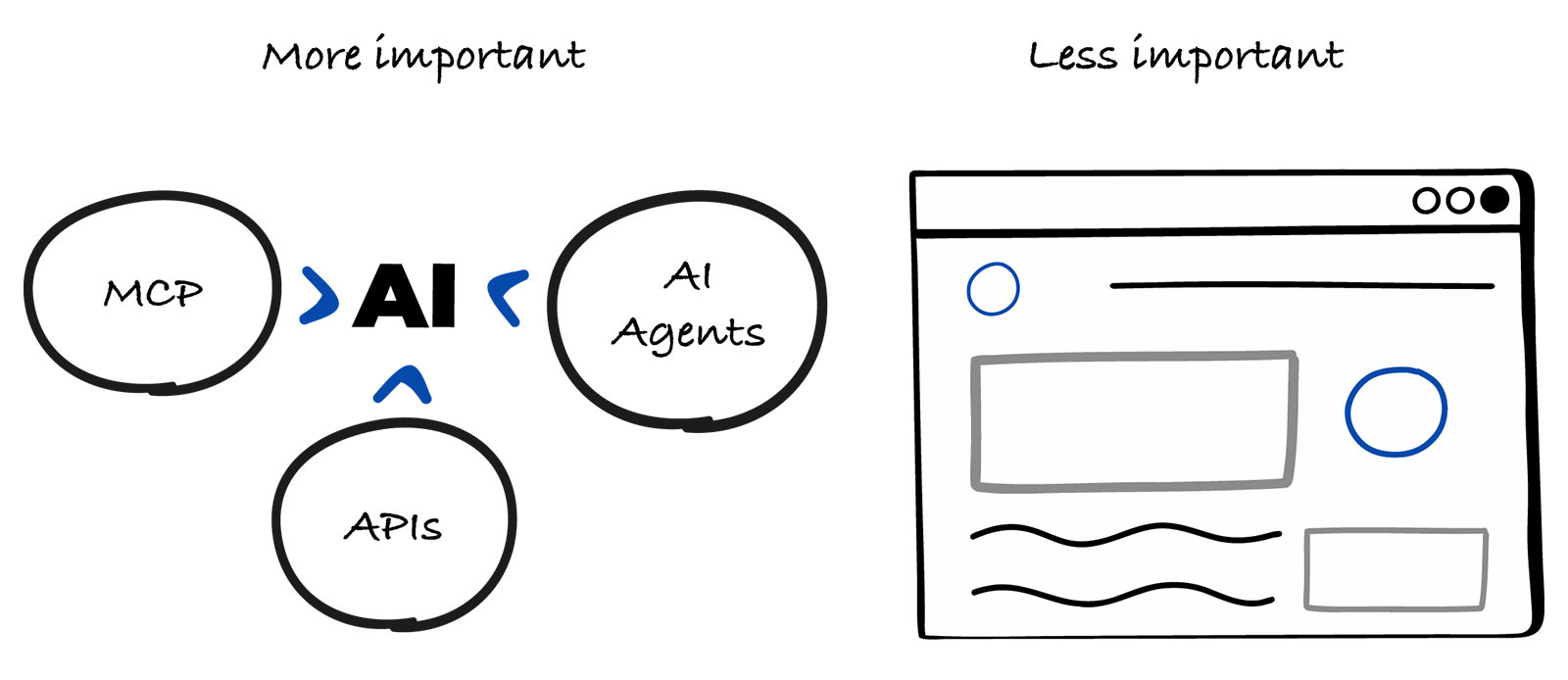
Future enterprise software will be run largely by AI agents, not humans clicking through user interfaces.
Interestingly, Salesforce has always been known for an interface-heavy experience, but now it is completely changing the script. Less UI, less clicking, more automation.
Here are some of the new things they have announced at the conference, exactly pointing out the change of direction.
Headless 360
The subtitle on the announcement page says it all:
Everything on Salesforce is now an API, MCP tool, or CLI command, and agents can use all of it.
With the question presented: “Why should you ever log into Salesforce again?”. Which points exactly in this direction, as we mentioned above.
The user interface is becoming less and less important for them, and automation is what is becoming the moat for them.
This quote represents what they want to do with Headless 360:
For 25 years, using Salesforce meant working inside Salesforce. A customer service rep opened a console, clicked into a case, and manually updated its status. A human, navigating a platform, to get work done.
But in the Agentic Enterprise, humans aren’t the only ones doing the navigating. Agents are too, and they don’t go to a browser or click through UIs. They call APIs, invoke MCP tools, and run CLI commands directly.
This is definitely something to think about for the AI strategy for your company. Ultimately, it’s in line with the trends these days, but the main question is: “Is it worth investing in UI, or focus a lot more on automation?”
Clearly, for Salesforce, automation is where their big bet is.
Agentforce Vibes
At the event, they introduced the new version (2.0) of the Agentforce Vibes. If you haven’t heard about it before, think of it like a GitHub Copilot, as the 2 main ways to use it are as a VS Code extension or directly in the browser.
You can write prompts directly inside the IDE, and you can use either the plan mode or the agent mode. The first one will just share the plan, and the second one will do what you ask.
Interestingly, I tried it out in 2 workshops. In the first one, I needed to build an app based on certain requirements. And if done correctly, you get a prize, and in the second one, I needed to use it in order to debug a LWC component correctly.
From my experience, I’d say it’s good if you are developing things on Salesforce, as that’s what it’s ultimately built and optimized for. But I’ll stick with Cursor or Claude Code for building at this time.
What’s missing from my experience is a Desktop-native app for Mac/Linux/Windows of the IDE. Because that’s how most of the developers build software these days, using a browser, not as much.
Agentforce
If you haven’t heard about Agentforce, it’s Salesforce’s platform for building AI Agents. At the TDX conference, they particularly announced 3 new things:
open-sourcing Agent Script
This was interesting for me, as I know Salesforce is known for building its own things, instead of reusing existing ones. Similar to what they did with LWC components and APEX programming language.
They have now open-sourced Agent Script, which is a language for defining how AI agents work, their reasoning, and responsibilities.
ADLC (Agent Development Lifecycle)
They announced a set of skills for Claude Code for building, deploying, testing, and monitoring Agentforce agents.
Agentforce Labs
They also created Agentforce Labs, where you can start building on the site directly or see some example use cases.
2. 3 Key AI Trends From Salesforce AI Research Team
It was interesting to get to know how they think about AI in general and where they see the future of it. The insights shared next are based on my discussion with Itai Asseo, VP, Salesforce AI Research.
He particularly mentioned that while AGI (Artificial General Intelligence) is something aspirational at the moment, EGI (Enterprise General Intelligence) is something that should be a clear focus for all enterprise companies.
EGI means using AI, its tools, and systems to perform business-specific tasks with high capability and consistency.
And that’s exactly what Salesforce is focusing on at the moment, as we mentioned above in the first section, their biggest bet is on AI Agents and less on User Interfaces.
Now, let’s go to the 3 trends they see as the most important at this time.
Simulation environments
This is the first trend mentioned by Itai, and he shared an interesting analogy:
Athletes train in safe, controlled places before real games. AI agents need the same thing.
AI Agents need to learn and improve in these environments before being used in real situations. This lets companies test them without taking risks.
A big part of this is synthetic data.
Companies shouldn’t always use real data because it might be private or sensitive. So instead, they should create fake data that looks real but is safe to use. Similar to how Formula 1 drivers practice in simulators before driving actual race cars.
Simulations are also useful for testing how well AI works. Companies can try different scenarios, like text or voice, and see where the AI struggles. Then they can fix those issues and make it more reliable before using it for real.
Itai also recommended that for companies just starting with AI, simulation is one of the easiest and most useful ways to begin. It gives them a safe space to try things, learn, and improve step by step.
This is where AI Evals come in, and I highly recommend reading these articles, if you want to jump further on how to properly test your AI features and simulate data:
Ambient Intelligence
This is the second trend, and it means that AI can always be there, working in the background. It understands what’s going on and helps without you needing to ask.
Itai mentioned an interesting analogy on this, which is the movie Her, where you have some kind of omnipresent agent, who is available to respond at any time, and at the same time, it’s proactive.
Itai mentioned that they recently shared an early beta version of PISA (Proactive In-Meeting Support Agent), a prototype for sales conversations. PISA can listen in the background, identify topics in real time, and push relevant talking points to the sales rep without being prompted.
He also mentions another use case, which is: A customer service agent could be supported with instant recommendations tailored to the specific customer and situation, while on the call.
The main benefit of ambient intelligence is that it fits smoothly into the work that a certain person is already doing. You don’t have to stop and ask for help, it just happens proactively. This saves time, makes work easier, and helps people do their jobs better.
For me, personally, I am always happy when I get recommendations that fit exactly what I need, without me even asking for them. So, I definitely think this is a field where companies can benefit a lot.
Agent-to-agent communication
This is the third trend that Itai mentioned, and it means the following. As companies use more AI agents, these agents need to work together.
Right now, most AI agents are built to talk to humans, not to each other. This causes issues when multiple agents try to work together, things can get messy or unclear. Sometimes it may look like they’re working together, but they’re not really doing it well.
To fix this, agents need a shared way to communicate. Think of it like a common language or system they all understand. This helps them stay on the same page, share information, and work toward the same goal.
This will become more important as companies move from using one AI agent to using many connected agents. If those agents can’t work well together, the whole system won’t work well.
Itai also shared that they recently did a study based on data from Moltbook, an AI-agent-only social platform, where they checked 800k posts, 3.5m comments, and 78k agent profiles.
Quoting from the study:
Our findings reveal agents produce diverse, well-formed text that creates the surface appearance of active discussion, but the substance is largely absent.
Which means, that Agent-to-agent communication is not at the level it needs to be at this time, and needs improvement.
3. How Salesforce Engineers Use AI to Build Their Products
These insights are from my conversation with Dan Fernandez, VP of Product for Developer Services, Salesforce. Interestingly, as we were talking, he was showing me how they use AI at Salesforce straight from his IDE.
Let’s get to the first example.
Prototyping and building MVPs is an important use of AI for them
Dan mentioned that the way they build products has changed a lot. They rarely go straight into building a full product right away, instead, they build quick prototypes and MVPs, and check if the idea is worth it.
Usually, they form a small group of cross-functional people, and they figure out what they want to build, create simple versions, and show them to the relevant people.
Dan shared an example from the past: We might build a dashboard for executives, with lots of features, and show it on a big screen. But then, they learn something important, executives mostly use their phones, not big screens.
So the idea needs to change. With building prototypes and MVPs, they avoid building the wrong thing. This saves time and helps everyone to focus on the right things.
Planning is where they use AI a lot
They have a CLI command in their developer tools called “deep planning.” This helps them think through a feature or an app before building it.
It asks simple questions, like:
What do you want to build?
How should it work?
What are the requirements?
It works like a back-and-forth conversation. You answer questions, and the tool helps shape a clear plan. The goal is not to write code right away. The goal is to create a solid plan first.
An example that Dan mentioned: If you want to build an asset tracker app, the tool will ask what kind of items you want to track and what the app should do. Then it helps define things like data, structure, and how everything fits together.
It also checks if something already exists that they can reuse. Instead of building everything from scratch, they try to reuse existing tools, APIs, or parts of code. This saves time and avoids unnecessary work.
The main idea is simple:
Plan first, reuse what you can, and only build what’s really needed.
Code quality and creating tests
They have a tool called Code Analyzer. It checks code quality using a large set of rules, around 700 now.
It’s built by them, but it also uses other tools. For example, it uses ESLint and an open-source tool for checking Apex code. They also built their own logic that checks how parts of the code connect to API calls, to catch deeper issues.
So it doesn’t just look at code line by line. It also checks how everything works together.
They run this tool at different stages:
while writing code (they can check the quality and review the code)
when the PR is opened, it will run automatically
In the CI process, when the PR is merged and when it is deployed to production
This helps catch problems early.
If you’ve been developing on Salesforce for a while, then you know that they require 80% of test code coverage before code can be deployed on the Salesforce platform.
With AI, it has now become easier to create tests, and the 80% of the test code coverage needed has become easier to achieve.
Observability is an important use case for AI
They have a tool called Scale Center.
It helps them understand how their work is performing while it’s running in production. It shows real-time insights, like what’s working well and what’s slowing things down.
Inside it, there’s another tool called ApexGuru. It looks at how the code behaves in reality and points out what needs fixing.
What’s useful is that they can see the insights directly in their developer tools. So instead of guessing, they get clear feedback on what to improve.
The system can also warn them early. For example, if they are running out of limits, if performance is dropping, if errors (like 500 errors) start happening.
It can also help fix issues (with AI):
find the root cause
explain what went wrong
suggest a fix
create a PR with changes
So instead of digging through logs and tools, they can get fast answers with it.
Every engineer can use AI tools that work for them
Even though Agentforce Vibes is the Salesforce version of GitHub Copilot, engineers are free to use what works best for them, which can be Claude Code, Cursor, or anything else.
What Dan has mentioned is that it’s very similar to a “vim vs emacs” debate, where neither one is the right choice, it’s the preference. Whatever works best for the specific engineer.
An important thing to mention as well is that they are doing more and more things through Slack. Slackbot has become a popular feature of Slack, which is an AI bot that can do things for you.
And what Dan has said is that a lot of collaboration happens directly through Slack, like for example working on different requirements together, making decisions, discussing things, and you can use Slackbot to help with all of that.
Last Words
I’ll also be sharing more about how their forward-deployed engineers work in one of the future articles. Stay tuned for that.
It’ll be interesting to see how things play out for them. It’s definitely a big shift, and for people who use their products as well.
Liked this article? Make sure to 💙 click the like button.
Feedback or addition? Make sure to 💬 comment.
Know someone that would find this helpful? Make sure to 🔁 share this post.
Whenever you are ready, here is how I can help you further
Join the Cohort course Senior Engineer to Lead: Grow and thrive in the role here.
Interested in sponsoring this newsletter? Check the sponsorship options here.
Take a look at the cool swag in the Engineering Leadership Store here.
Want to work with me? You can see all the options here.
Get in touch
You can find me on LinkedIn, X, YouTube, Bluesky, Instagram or Threads.
If you wish to make a request on particular topic you would like to read, you can send me an email to info@gregorojstersek.com.
This newsletter is funded by paid subscriptions from readers like yourself.
If you aren’t already, consider becoming a paid subscriber to receive the full experience!
You are more than welcome to find whatever interests you here and try it out in your particular case. Let me know how it went! Topics are normally about all things engineering related, leadership, management, developing scalable products, building teams etc.